


 BlenDock
Available NowYour Blender projects under control.
Manage your Blender projects, files, versions, installs, health and external assets — all in one place.
- Windows may show a security warning the first time, because Thevyn is a new publisher. Choose More info, then Run anyway. If it doesn't open at all on Windows 11, see the FAQ on the BlenDock page.
A looping fourteen-second silent sequence moving through four BlenDock views: the project window with its file table, a project's files with the Blender version each one opens in, the list of detected Blender installs, and the file inspector.
- Project organisation
- Version matching
- File inspection
- Project health
- External files
- Favourites and search
In short
One place for the whole project.
Blender work spreads out fast. Scenes live in one folder, textures in another, and the build that opened a file six months ago is no longer the default. BlenDock gathers that scattered state into a single view: every project, the files inside it, the Blender version each one belongs to, and the external assets it depends on. It is local-first: projects stay ordinary folders and files on your computer, and organising them in BlenDock — grouping, sorting, moving between projects — never moves anything on disk.
Work smarter
Everything you need for a smooth Blender workflow.
BlenDock brings clarity to your projects with tools built for the way real Blender work actually accumulates — many files, several Blender versions, and a long tail of linked assets.
- Organise projects and files with ease
- Handle multiple Blender versions
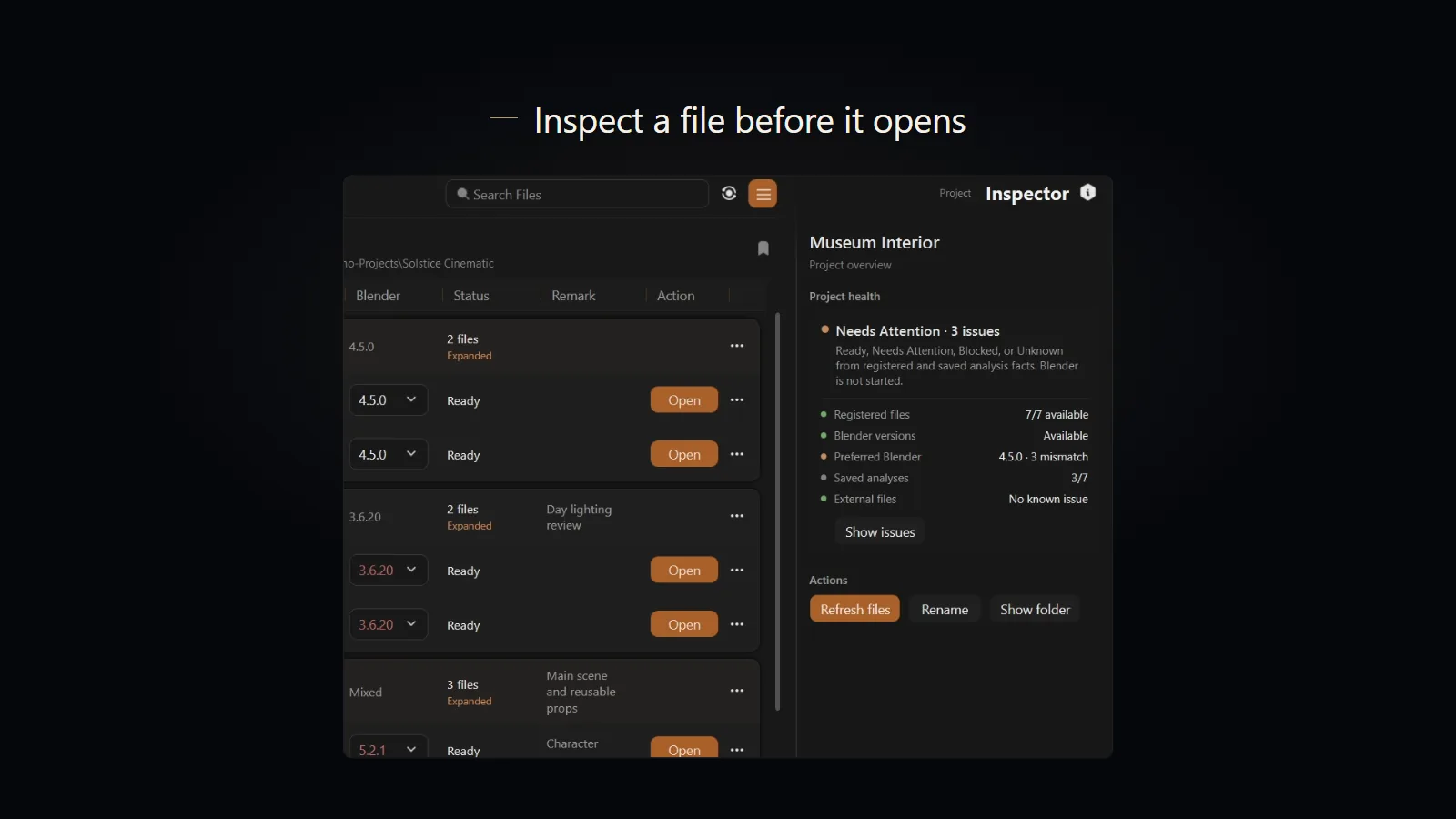
- Inspect files before opening
- Track external assets and dependencies
- Keep your projects healthy and accessible
Stay organised
Keep your Blender world organised.
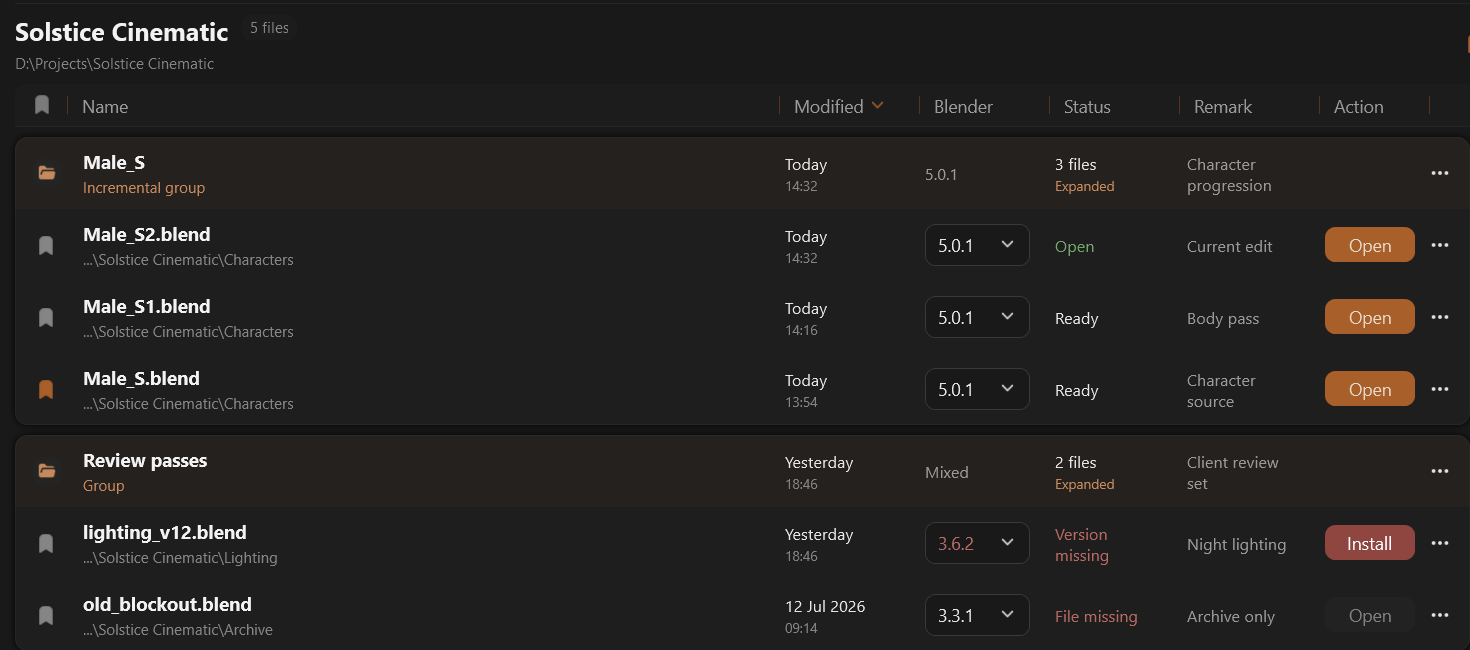
Simple but capable organisation tools, built for how projects actually grow rather than how they look on day one.
Projects
Keep all your Blender work in one place.
Groups
Organise with custom groups.
Favourites
Quick access to what matters.
Remarks
Add notes and context to your files.
File history
See how your files evolve over time.
Search
Find anything, instantly.
Use the right tools
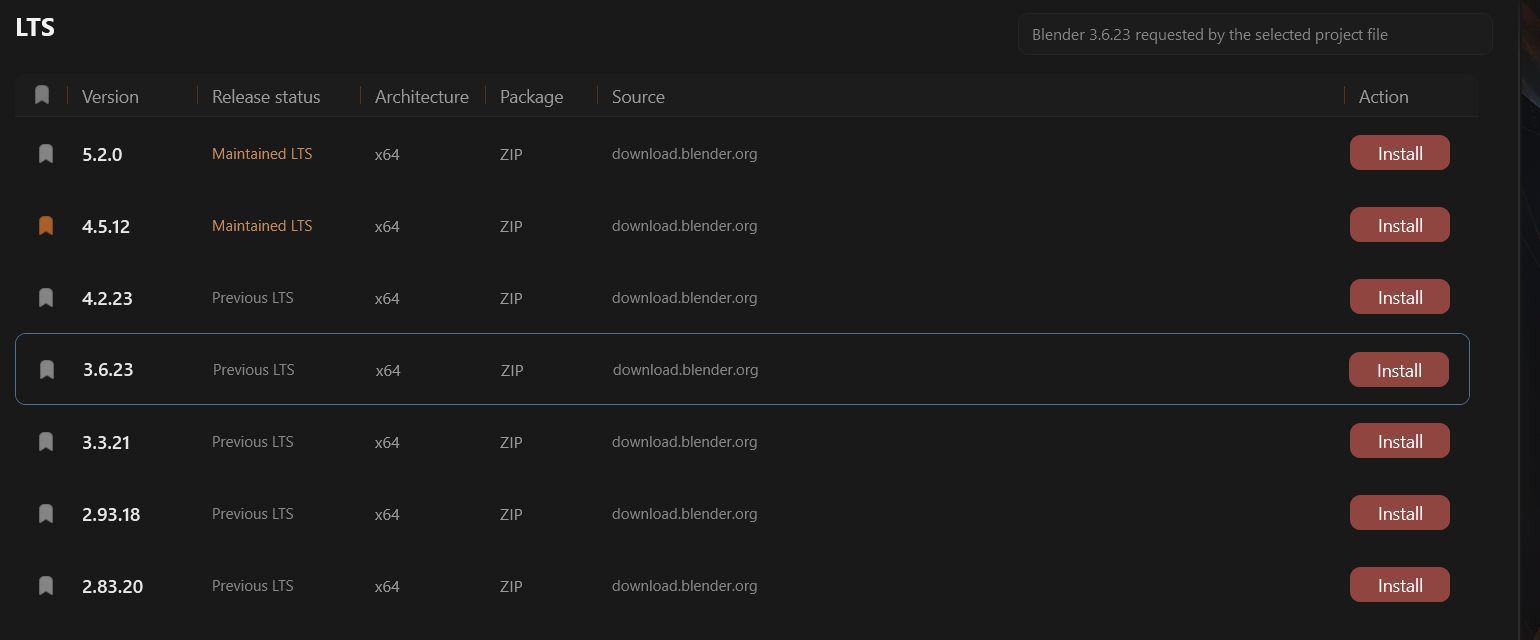
Open files in the right version.
No more guessing. BlenDock finds the Blender versions already on your computer, and when a file needs one you don't have, it takes you straight to that version in Blender's official downloads. Open a file in a different version and BlenDock first offers to open a copy or back up the original, so nothing is overwritten.
Know before you open
Know more before you open.
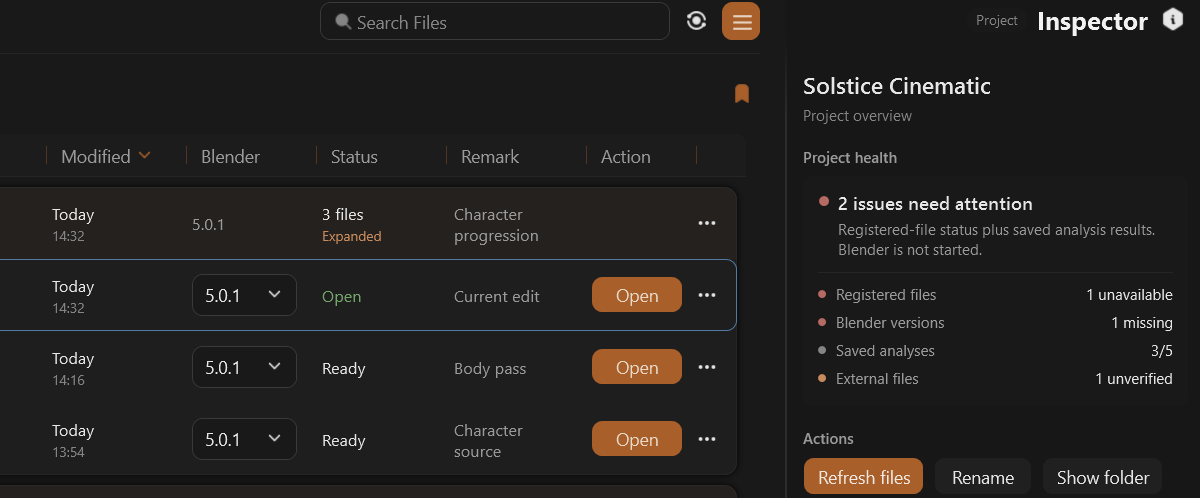
Get a clearer picture of a file before it loads — a preview, the technical detail, the linked files it pulls in, and a health check — so you can open it with confidence instead of waiting to find out.
Share the setup
Hand a project over cleanly.
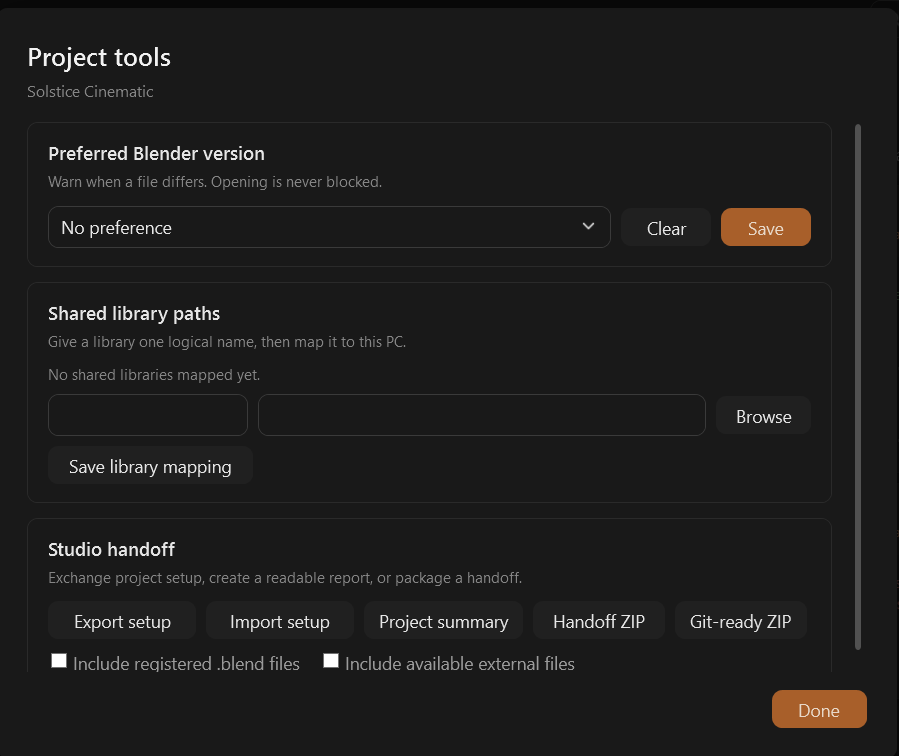
Project tools set a preferred Blender version, give each shared library one name that every computer maps to its own folder, and export the project's setup, a readable summary or a handoff ZIP — with the .blend files and their available external files included if you choose.
What changes
Less managing. More making.
Less file hunting
Projects, groups and favourites replace the folder tree you keep re-learning every time you come back to a scene.
Fewer version mistakes
Files open in the Blender build they belong to, so scenes behave the way they did when you last saved them.
Fewer surprises
Size, engine, object counts and linked files are visible up front, before a heavy scene commits you to the wait.
More time creating
The session goes on the work instead of on the admin that surrounds it.
Plans
Three plans. One payment.
BlenDock is bought once, not subscribed to. Try every feature free for 14 days. After that, Basic stays free for up to three projects; Pro and Studio are one-time purchases that unlock unlimited projects and more features with an activation key.
Purchases open soon.
One-time payment. Not a subscription.
Basic
For getting started, with up to three projects.
Free
Permanently, after the 14-day trial.
- Free, permanently
- Up to three projects
- Projects, groups, favourites, remarks and search within a project
- Open each file in the right Blender version, with Safe Open
- Find and download Blender versions
- Project health and backup
- One user
- No activation key needed
Pro
For a working artist.
₹1,999once
Launch price. ₹2,999 afterwards.
- Unlimited projects
- Everything in Basic
- File inspection, linked-files check and file history
- Search across all projects, and asset search
- Live viewport thumbnails and a preferred Blender version per project
- Project setup export and import, project summary and handoff ZIP
- One user, on up to three computers
- Activated with a purchased key
- Permanent licence for the version you buy
Studio
For a team sharing projects.
₹6,999once
Launch price. ₹9,499 afterwards.
- Everything in Pro
- Shared libraries
- Git-ready ZIP
- Five users, one computer each
- Additional users can be purchased
- Permanent licence for the version you buy
- Additional Studio user
- ₹1,499
- One-time, per user, on top of the five Studio includes.
- Pro to Studio
- ₹5,000(₹6,500 after the launch period)
- Pay the difference between the two plans rather than buying Studio again.
Try every feature free for 14 days.
- Every new install starts with a 14-day free trial of every feature, with no project limit. No key and no payment details.
- After 14 days BlenDock continues as Basic: free, permanently, for up to three projects. Everything you made stays where it is.
- Buy Pro or Studio and enter your key to unlock the rest again. Your projects, settings and data stay exactly as they are.
What the licence covers.
- A purchase is permanent for the plan and version you bought.
- Bug fixes, maintenance releases and minor updates are free.
- A future major version may be a paid upgrade. If you skip it, you keep the version you paid for.
- A Pro key is for one person, on up to three computers. A Studio key covers five people, one computer each, plus any extra users you buy.
- An existing Basic install upgrades in place by entering a purchased key.
- Reinstalling on the same computer is free. To move to a new computer, deactivate BlenDock on the old one, then activate it on the new one.
- A licence can't be passed on or resold to someone else.
Good to know
- Tax is calculated at checkout, so prices here are shown before any tax that may apply.
Compatibility
What you need to run it.
- Platform
- Windows 10 and 11, 64-bit (x64)
- Works with
- Blender, installed separately. BlenDock finds the versions you have and can download official builds.
- Tested with
- Blender 3.5, 3.6, 4.2, 4.5 and 5
- Installation
- A ZIP file: unzip it and run BlenDock. Nothing to install, and its data stays in a folder beside it
- Licence
- Every feature free for 14 days. After that, Basic is free for up to three projects and needs no key; Pro and Studio unlock unlimited projects and more features with a purchased key.
Other Blender versions may work, but only the versions listed above are tested.
FAQ
Questions, answered.
Is BlenDock free?
Every new install starts with a 14-day free trial of every feature. After that BlenDock continues as Basic, free for up to three projects. Pro and Studio unlock unlimited projects and more features with a one-time purchase.
What happens when the trial ends?
Nothing you made is removed. Your projects, files and settings stay as they are and the basic features keep working. Adding more than three projects, and the Pro and Studio features, need a licence key.
Is it a subscription?
No. Pro and Studio are one-time payments and the licence is permanent for the version you buy. Bug fixes and minor updates are free; a future major version may be a paid upgrade, and if you skip it you keep the version you have.
What is the difference between Pro and Studio?
Pro is for one artist: unlimited projects plus file inspection, the linked-files check, file history, asset search, search across all projects, live viewport thumbnails, a preferred Blender version per project, project setup export and import, and the project summary and handoff ZIP. Studio adds shared libraries and the Git-ready ZIP, for a team of five.
How many computers can I use it on?
A Pro key is for one person on up to three computers. A Studio key covers five people, one computer each, and more users can be added. To move to a new computer, deactivate BlenDock on the old one first, in Settings → General.
How do I activate my licence key?
Your key is emailed to you right after payment. In BlenDock, open Settings → General, paste the key and click Activate.
Does BlenDock work offline?
Yes. Your projects and files stay on your computer, and an activated key keeps working without an internet connection. BlenDock goes online only to download Blender versions and their release lists, to check a licence key, and to see whether a newer BlenDock is out.
Does BlenDock upload my .blend files?
No. BlenDock is local-first: your project list, file details, remarks and settings stay on your computer, and it never sends your .blend files or project information to us.
Which Windows and Blender versions does it support?
Windows 10 and 11, 64-bit. BlenDock is tested with Blender 3.5, 3.6, 4.2, 4.5 and 5. Blender is installed separately; BlenDock finds the versions you have and can download official builds.
BlenDock doesn't open on my Windows 11 PC. Why?
Some Windows 11 PCs have Smart App Control turned on. It blocks new apps that aren't digitally signed yet, and BlenDock 1.0 isn't signed yet, so on those PCs it may not open. We're working on a signed version. Meanwhile, email [email protected] and we'll help.
How do I update BlenDock?
BlenDock tells you when a newer version is out. Download it from the Downloads page and unzip it into the same folder, replacing the old files. Your projects, settings and licence stay.
Can I get a refund?
Yes, a full refund within 14 days if BlenDock doesn't work on a supported setup and we can't fix it, and duplicate charges are always refunded. The free trial is there so you can try every feature before you buy. The Refund Policy has the details.
How do I get help?
Email [email protected]. We reply within 2 working days.
For Blender artists
A smoother Blender tomorrow.
Spend less time managing files and more time creating. BlenDock is built to make a Blender workflow feel organised and predictable, from the first project to the hundredth.
- Windows may show a security warning the first time, because Thevyn is a new publisher. Choose More info, then Run anyway. If it doesn't open at all on Windows 11, see the FAQ on the BlenDock page.